Start free trialTry free

Kinetic ViewvsSalesforce

The remodel workflow, out of the box.

Salesforce is priced per user, and remodelers often add a remodel CRM built on top of it, such as improveit 360. Kinetic View is that remodel workflow already, at one company price.

14-day trial · No card to start · Founding price $49.99/month

Salesforce details from salesforce.com/sales/pricing and appexchange.salesforce.com/appxListingDetail?listingId=a0N3A00000GCUtVUAX, accessed Oct 26, 2026.

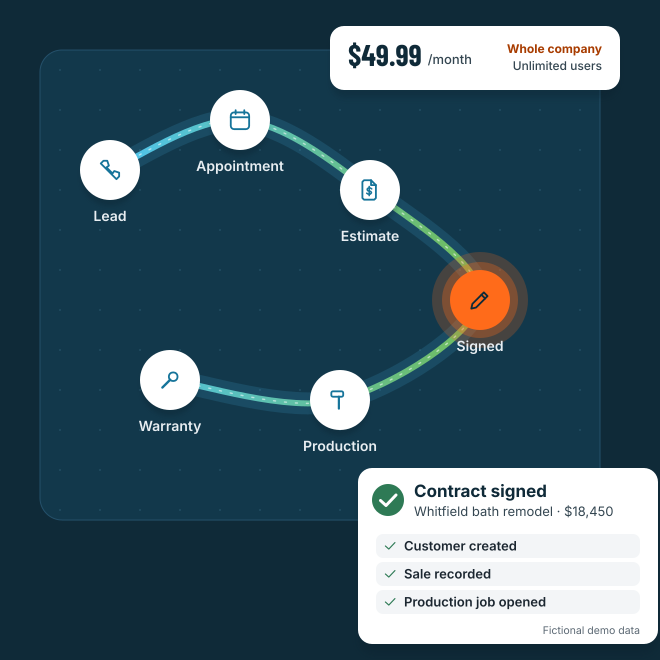
One connected path: lead, appointment, estimate, signed, production and warranty. A signed contract creates the customer, records the sale and opens the production job. Fictional demo data.
$49.99per month for the whole company
Unlimitedusers, office and field
Month to monthcancel anytime, no setup fee
Built inestimating, proposals and e-sign

At a glance

Who each one is built for.

Both are CRMs for contractors. They’re built around different ideas of how your team buys and uses software.

Kinetic View

Built for

Remodelers, roofers, painters and home service teams that sell in the home. Leads, estimates, the kitchen-table signature, production and warranty work live on one customer record, at one company price.

  • Unlimited users
  • Month to month
  • No setup fee
  • Estimating and e-sign included

SalesforceGeneral CRM

Built for

Sales organizations of every size. It’s a highly customizable enterprise CRM, with Starter Suite and Pro Suite for small businesses and Core, Advanced and Max for larger teams. Salesforce points customers to its Professional Services and certified partners for implementation.

Sources12

Price comparison

A contractor-sized bill.

Published list prices, side by side. One price covers your whole company on Kinetic View.

Kinetic View

$49.99/month per company

Founding price

Locked for the first 8,888 companies for as long as your subscription stays active.

  • Unlimited users
  • Month to month, cancel anytime
  • No setup fee
  • Estimating, proposals and e-sign included
Start my 14-day trial

14-day trial. No card to start.

Salesforce

PlanPer user
Starter Suite$25/user/mo
Pro Suite$100/user/mo
Core$195/user/mo
Advanced$395/user/mo
Max$550/user/mo
  • Pro Suite and above are billed annually, and Pro Suite says “contract required.”
  • Scheduling, field service and contact center are separate add-ons, such as Scheduler at $25 per user per month. 3

From the published pricing page 12salesforce.com/sales/pricing · accessed Oct 26, 2026

Example: a team of 6

Monthly cost at published list prices. Your quote may differ.

Salesforce Pro Suite
6 × $100$600/mo
Kinetic View
$49.99/mowhole company, any team size

Billed annually. Scheduler, e-signature and field service cost extra.

Texting, email delivery and outside services may need their own provider accounts. Customer payment processing isn’t included.

Feature by feature

Side by side, with sources.

Fourteen things contractors ask about. Every Salesforce detail links to a numbered source below.

KeyIncludedPartialAdd-onNot offeredUnknownUnknown = not found in public sources
Kinetic View and Salesforce, feature by feature. Status first, then details and sources.
Feature Kinetic ViewSalesforceSources
01Price for your whole team Kinetic ViewIncluded

One company price, unlimited users.

SalesforceAdd-on

Per user: $25 (Starter Suite) to $550 (Max) per month.

Sources12
02Month-to-month plan Kinetic ViewIncluded

Month to month. Cancel anytime.

SalesforcePartial

Starter Suite can be billed monthly. Pro Suite and up are annual.

Sources21
03Onboarding and setup Kinetic ViewIncluded

Guided setup, seven trade starter packs, no setup fee.

SalesforcePartial

No required fee listed. Implementation usually through partners or Salesforce Professional Services.

Sources1
04Remodel workflow out of the box Kinetic ViewIncluded

Leads, estimates, contracts, production and service are built in.

SalesforceAdd-on

Remodel CRMs such as improveit 360 and ContractorFlow are sold on AppExchange.

Sources910
05Built-in estimating and costbook Kinetic ViewIncluded

Costbook with 5-level folders, custom order, CSV import, pricing rules.

SalesforcePartial

Products, price books and basic quotes. Advanced CPQ (Revenue Cloud) from $200/user/month.

Sources16
06Branded proposals and e-signature Kinetic ViewIncluded

Branded PDFs. Homeowner and co-signer sign; the rep countersigns.

SalesforceAdd-on

Quote PDFs from templates. E-signature through AppExchange apps.

Sources67
07In-home presentation mode Kinetic ViewIncluded

Full-screen homeowner view. Exiting needs Face ID or the passcode.

SalesforceUnknown

We found no native presentation mode.

—
08Separate calendars and booking Kinetic ViewIncluded

Appointments, Sales, Production and Service, each on its own calendar.

SalesforceAdd-on

Scheduler ($25/user/month) for booking; Field Service for dispatch.

Sources34
09Call center and phone system Kinetic ViewPartial

Call queues, callbacks, calling hours and do-not-call. Calls use your phone’s dialer.

SalesforceAdd-on

Voice from $50/user/month; Contact Center from $125/user/month.

Sources3
10Two-way text inbox Kinetic ViewIncluded

Shared inbox. Connect your own Twilio or SimpleTexting; the provider bills texts.

SalesforceAdd-on

Through Contact Center Digital or AppExchange texting apps.

Sources3
11Native mobile apps Kinetic ViewPartial

Android on Google Play. iPhone and iPad app coming soon.

SalesforceIncluded

Salesforce app for iPhone, iPad and Android.

Sources5
12Works offline Kinetic ViewPartial

Estimate totals calculate offline. Everything else needs a connection.

SalesforceIncluded

Admins can turn on offline editing in the mobile app.

Sources8
13Production and job tracking Kinetic ViewIncluded

Spreadsheet-style Matrix: sold amounts, recorded payments, materials, costs, milestones.

SalesforceAdd-on

Field Service licenses ($175 to $230/user/month) or remodel apps from AppExchange.

Sources49
14Integrations Kinetic ViewNot offered

No QuickBooks. Lead-delivery webhook and assistant (MCP) connection.

SalesforceIncluded

AppExchange, with 9,000+ partner apps and expert listings.

Sources11

Sources All accessed Oct 26, 2026. Links open the vendor’s public page.

  1. Salesforce Sales Cloud pricingsalesforce.com/sales/pricing Accessed Oct 26, 2026. Confirmed source.
  2. Salesforce small business pricingsalesforce.com/small-business/pricing Accessed Oct 26, 2026. Confirmed source.
  3. Salesforce Service add-ons pricingsalesforce.com/service/pricing/add-ons Accessed Oct 26, 2026. Confirmed source.
  4. Salesforce Field Service pricingsalesforce.com/service/field-service-management/pricing Accessed Oct 26, 2026. Confirmed source.
  5. Salesforce, App Storeapps.apple.com/us/app/salesforce/id404249815 Accessed Oct 26, 2026. Confirmed source.
  6. Help: Create a quote PDF, seen via search excerpt (secondary)help.salesforce.com/s/articleView?language=en_US&id=sales.quotes_create_pdf_selected_template.htm&type=5 Accessed Oct 26, 2026. Secondary source.
  7. S-Docs S-Sign, seen via search excerpt (secondary)sdocs.com/products/s-sign Accessed Oct 26, 2026. Secondary source.
  8. Help: Enable offline access, seen via search excerpt (secondary)help.salesforce.com/s/articleView?language=en_US&id=sf.salesforce_app_enable_offline_access.htm&type=5 Accessed Oct 26, 2026. Secondary source.
  9. AppExchange listing, improveit 360appexchange.salesforce.com/appxListingDetail?listingId=a0N3A00000GCUtVUAX Accessed Oct 26, 2026. Confirmed source.
  10. AppExchange listing, ContractorFlowappexchange.salesforce.com/appxListingDetail?listingId=a0N4V00000Gl557UAB Accessed Oct 26, 2026. Confirmed source.
  11. News: AppExchange marketplace, seen via search excerpt (secondary)salesforce.com/news/stories/idc-marketscape-application-platform-marketplaces-2025-2026 Accessed Oct 26, 2026. Secondary source.
  12. Reviews on Capterra, seen via search excerpt (secondary)capterra.com/p/61368/Salesforce/reviews Accessed Oct 26, 2026. Secondary source.

Fair is fair

Where Salesforce is strong.

If these matter most to your business, Salesforce is worth a serious look.

Room to customize and grow.

Custom objects, custom apps, Flow automation and an enterprise security tier.

1

The biggest ecosystem.

Thousands of AppExchange apps, including remodel CRMs built on Salesforce.

11910

A strong mobile app with offline editing.

iPhone, iPad and Android, rated 4.8 on the App Store, with offline editing admins can turn on.

58

Serious dispatch tools.

Field Service adds AI scheduling and route optimization.

4

Reviewers praise its customization, automation and analytics once it’s running. 12

Switching from Salesforce?

Switching doesn’t have to suck.

  • Bring your costbook. Import a CSV spreadsheet. Preview the items, then apply.

  • Bring your leads and history. Map fields, preview a small batch, check it, then move the rest. Duplicate checks flag conflicts, and imports never message customers.

  • Guided setup. Plain-language steps and seven trade starter packs. Follow-ups start paused until you turn them on.

  • Searchable help and email support. Help center at kineticview.io/help, in-app help search, and support@kineticview.io on business days.

Start my 14-day trial
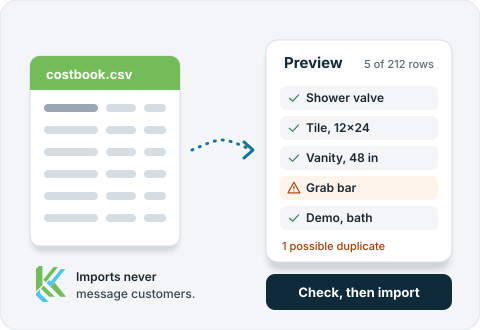
A costbook CSV previewed before import: five of 212 rows checked, one possible duplicate flagged, then Check, then import. Imports never message customers.

Straight answers

Before you jump in.

Is Kinetic View cheaper than Salesforce?

For most remodel teams, yes. Kinetic View is $49.99/month for the whole company with unlimited users. Salesforce is priced per user, from $25/month on Starter Suite to $550/month on Max, and Pro Suite and up are billed annually.

1
Can Salesforce run a remodel business?

Yes, with work. Remodelers often add a remodel CRM built on Salesforce, such as improveit 360 or ContractorFlow, or hire a partner to configure it.

910
Do I need a partner to set it up?

Kinetic View has guided setup with seven trade starter packs and no setup fee. Salesforce points customers to its Professional Services and certified partners for implementation.

1
Is texting included?

Kinetic View has a two-way Message Center. You connect your own Twilio or SimpleTexting account, and that provider bills for texts.

Does Kinetic View work offline?

Estimate totals calculate without a connection. Everything else, including signing, needs one. Salesforce’s mobile app supports offline editing when an admin turns it on.

8
Can I bring my data over from Salesforce?

Yes, if you can export it to CSV. Our import tools map your fields, preview a small batch and flag duplicates before you move the rest.

You’ve got work to do.

Try it with your real workflow for 14 days.

No card to start. $49.99/month for the whole company after that.

Start my 14-day trial